My Top 5 CRM Automations That Save Hours Per Week
Your CRM should be doing more than storing data, it should be saving you time by reducing the number of keystrokes you type per day. With the right automation, you can rely less on shaky human memory so you can focus on tasks artificial intelligence cannot do for you. The CRM in your organization should function more like an employee than a fancy spreadsheet. If you’re interested in getting your CRM to work for you, try out 5 of my favorite CRM automations.
Note: These are automations built in Super Easy CRM, but other platforms like Dynamics 365 have similar features when coupled with tools like Power Automate. The benefit of Super Easy CRM is that all of these are built-in, with no coding required.
Automation #1: Onboarding New Hires by Department
Onboarding new employees, especially in highly regulated environments, is not only time consuming but potentially risky to your organization's security posture if done incorrectly. You never want to give someone more access than they need to a resource. And, conversely, you don’t want to give them so little access that they can’t be productive.
For these reasons, onboarding needs to be automated AND specific to the user’s role. The director of your IT department, for example, wouldn’t need the same level of access the accounting manager has.
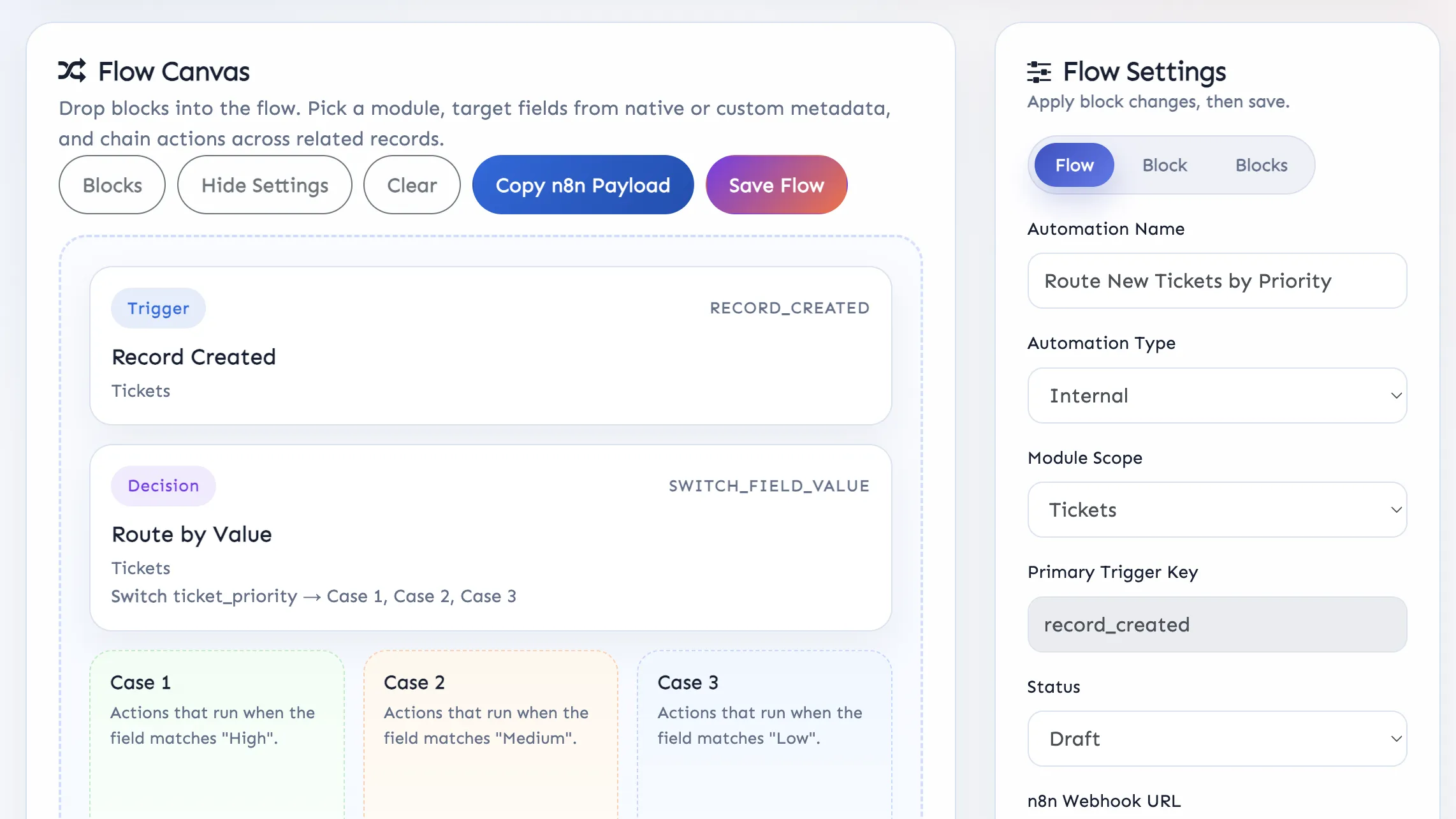
Here’s how to set it up in Super Easy CRM using the Automation Builder.
Define the trigger: When a record is created.
Define the scope: Tickets.
Tell it when to fire: If the ticket type is onboarding, department is marketing, and the user's organization role is director, for example.
Tell it what to do: Create a task called Add to Google Workspace and assign it to IT Manager. Next, create a task called Assign Read and Write permissions for users for Super Easy CRM. And so on…
This is exactly how you avoid compliance issues, get people the right tools they need on day one, and prevent things from slipping through the cracks. And, if your policies change, just let your CRM Admin know and they can tweak the Automation to bring it in line with the new business rules.
Automation #2: Offboarding New Hires Based on Their Access Level
This one is arguably more important than onboarding. Giving someone too much access is bad, but allowing them to keep access after they’ve left the company can be catastrophic. Imagine firing someone who had delete or edit access to your CRM. They could deface as many records as they want, extract sensitive information, and much more.
To ensure no zombie accounts are left around, you can build an automation that lets your IT department know exactly what accounts need to be deprovisioned.
Here’s how to set it up. It’s essentially the inverse of the onboarding process.
Define the trigger: When a record is created.
Define the scope: Tickets.
Tell it when to fire: If the ticket type is offboarding, the department is marketing, and the user's organization role is director, for example.
Tell it what to do: Create a task called Remove from Google Workspace and assign it to IT Manager. Next, create a task called Remove CRM Access. And so on…
Bonus: During an employee’s tenure, they will likely get access to more applications than what was initially added to their onboarding ticket. To capture this, set your automation to look for any ticket requests with Ticket Type of Access Request for the departing employee. Just be sure that all requests for system access go through the ticketing system in your CRM.
Automation #3: Set Alerts for High Risk Clients
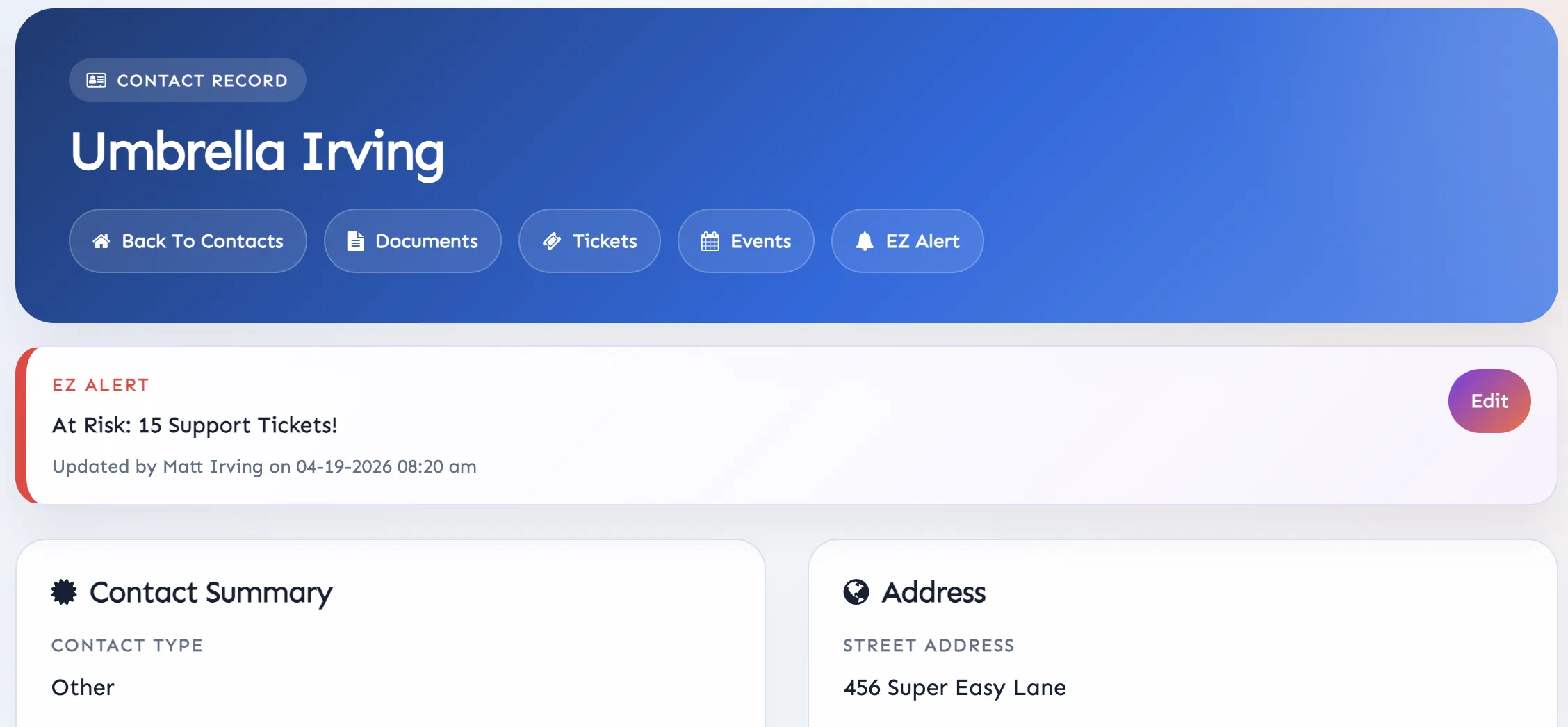
It's a lot easier to retain clients than it is to get new ones. The best way to do this is to keep a watchful eye on issues before they get out of hand. This is where EZ Alerts in Super Easy CRM come in handy. This functionality allows you to customize a banner that appears on a Contact, Lead, or Company record.
Here’s how to set it.
Define the trigger: Ticket count (or whichever you define).
Define the scope: Ticket.
Tell it when to fire: When a Contact record has 5 related tickets with a ticket type of support or complaint.
Tell it what to do: Create an EZ Alert on the Contact record informing users this Contact is now at high risk of terming.
Bonus: Create a scheduled companion report that sends supervisors a list of Contacts and Companies that hit this threshold.
Automation #4: Know when your CRM is too heavily customized
A problem that I have seen time and time again is over customization. With how flexible platforms like Super Easy CRM and SuiteCRM are, people can get carried away with the number of custom fields and automations. To help keep your creativity from kneecapping your productivity, build a system health check automation.
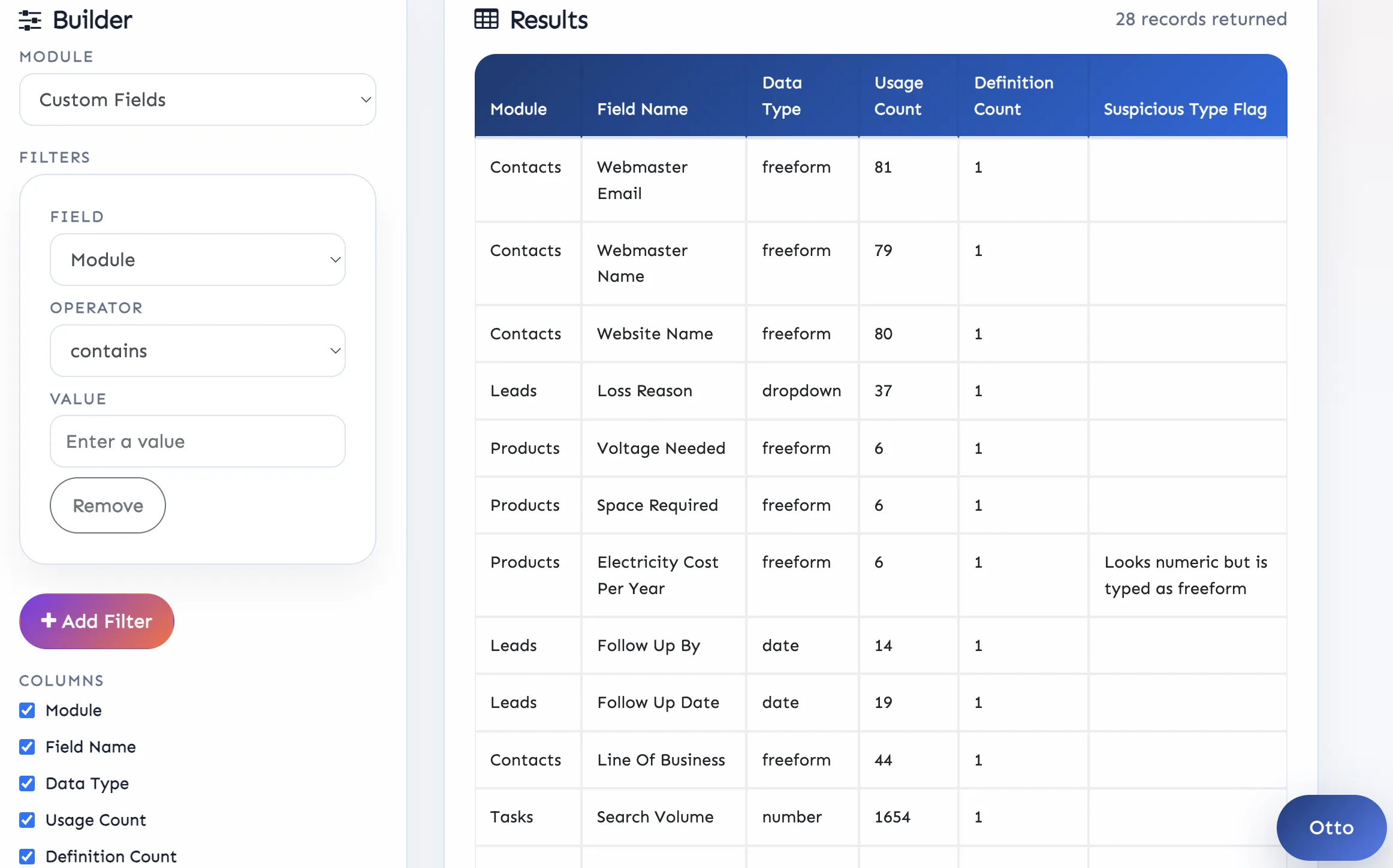
This automation isn’t triggered through the workflow builder like the others. Rather, you use Otto (Super Easy CRM’s AI Agent) to create a system audit report. Here’s how to do it.
Open the Otto prompt at the bottom right of your screen.
Ask Otto to create a system health audit and send it to you every two weeks.
It’ll give you a preview and ask you to confirm.
Once confirmed, you can view the report.
The report shows you useful information like how often the field is used, if it’s using the correct data type, and if there is any redundancy present. This tool is a CRM Admin/Developer’s best friend and one of the best ways to ensure your CRM strategy is healthy. I’ve audited hundreds of systems over the past decade and more often than not, business owners had no idea what hundreds of custom fields were being used for.
Automation #5: Project autopsy, summarize lessons learned and key takeaways
Some projects are grueling and when the project manager finally toggles the status from In Progress to Complete, they rarely remember all the pitfalls and triumphs of the venture. Instead, they have to comb through notes, emails, tickets, and tasks to stitch together a workable and readable document. This is a thing of the past with Otto and the Automation Builder. Here’s how to set it up.
Define the trigger: Project Status is set to Complete.
Define the scope: Project.
Tell it when to fire: When a Project’s status is complete and all tasks and tickets are set to complete or abandoned.
Tell it what to do: Summon Otto and have him read all tickets, tasks, events, milestones, and notes associated with each module. Once read, compile a Lessons Learned document as a PDF to be emailed to the Project Manager listed on the project.
Bonus: Don’t wait until the project is complete to get a holistic review performed. You can set automations to run pulse checks throughout the project. Tweak the automation a bit to have it fire at certain completion percentages. These are great for weekly updates to executives and clients. Though you may want to redact a bit of information before sending it externally.
Your CRM is Your Partner, Put it to Work
Too many teams are spending time working their CRM instead of having it work for them. Platforms with built-in automations and AI agents like Otto are here to offload the administrative work that prevents salespeople from closing deals and operations teams from working efficiently. If you’re ready to upgrade your day-to-day, sign up for a risk-free 30 day trial of Super Easy CRM. Or, if you’d like to super charge your existing platform, I’m only a DM away on the socials listed below.

Posted by: Matt Irving on 04/19/2026