From CRM Admin to Solution Architect in the Age of AI
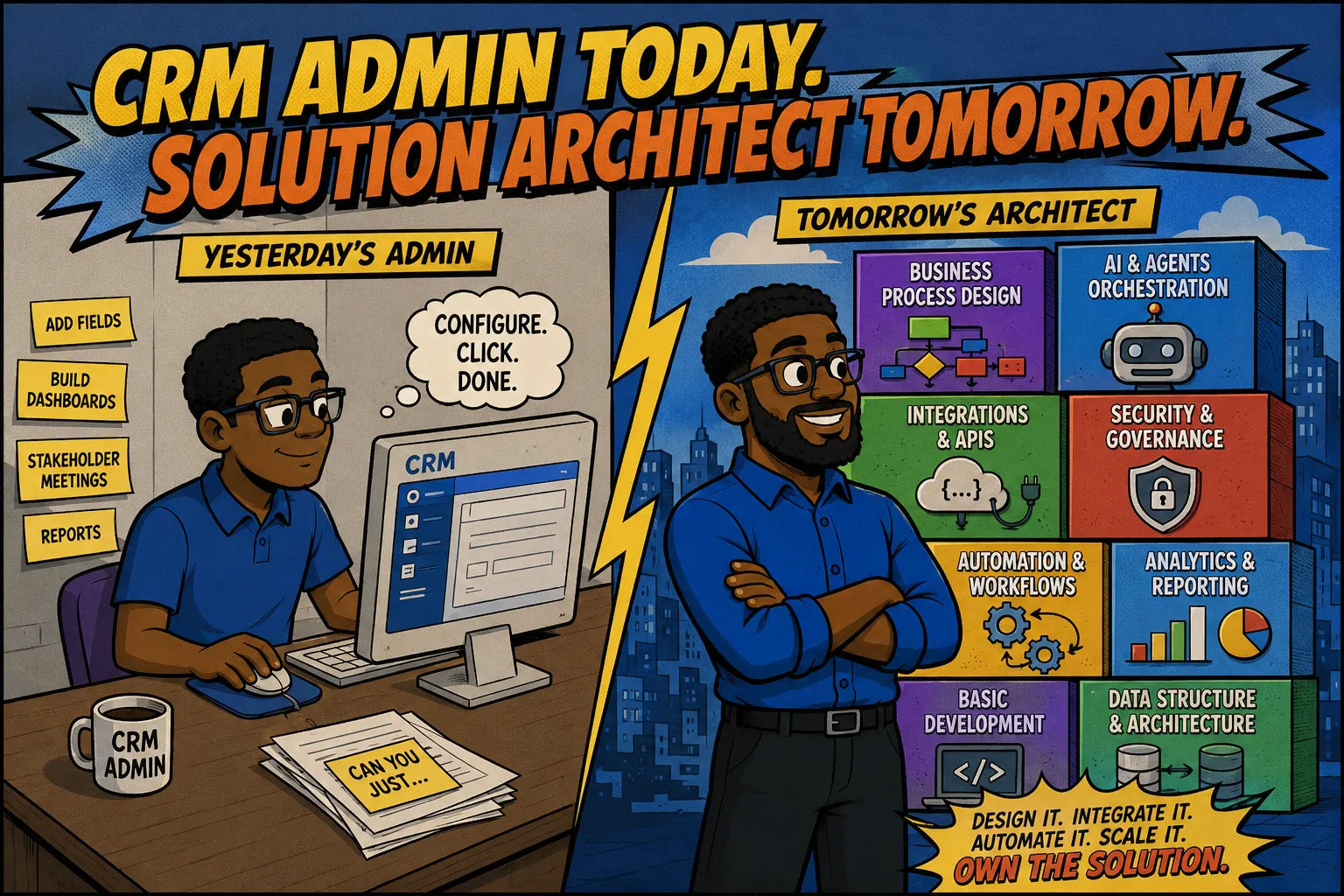
Being a CRM Admin in the past meant you were the person responsible for configuring the system for use by an organization. Tasks might include things like building dashboards, configuring objects/modules, adding a bunch of fields people request but never use, sitting in long pointless stakeholder meetings, and so on. But in the age of AI things have drastically changed for CRM admins, consultants, and analysts.
Those who are responsible for the company's CRM are being tasked with integrating with other applications, building it into AI orchestration platforms, and managing security configurations. The latter gets particularly complicated in regulated industries as field-level permissions can get weird depending on the business process. These are things that AI cannot do as well since they require a deep understanding of the underlying business processes, industry compliance requirements, company culture, and more.
The art of marrying a complex technical workflow to a business process is probably one of the few things the robots can't beat us at yet. So the role that was once scoffed at as a ‘button clicker’ or ‘drag-n-dropper’ (made that last one up), is now more aligned with a Solution Architect.
And that's what we'll focus on in this week's article. The CRM-centric skillsets listed below will help level you up from a humble CRM Admin to a fully fledged Super Saiyan Solution Architect.
01Knowing When To Use Middleware
I built the CMS and application you're looking at right now years and years ago prior to AI coding agents in pure PHP, SQL, and JavaScript. I don't say that to brag, I say it to illustrate the countless hours I spent hand-coding my dream. As such I'm extremely passionate about it and think it's the greatest SaaS money can buy.
But, passion aside, it's not always the right tool for every single situation. While Super Easy CRM can be part of the solution it is not always THE solution…at least not by itself. Sometimes even the best CRM needs a teammate and that's where middleware comes in handy.
This middleware can be something prebuilt or something custom-built like Flask. I once worked on a Dynamics 365 project that involved spamming a bunch of API calls to a pretty crummy software from a vendor with the most stringent requirements known to man.
They essentially refused to allowlist a range of IPs, would only allocate X number of IPs per month, and charged roughly $1,500 to add new ones. Since I was using Dynamics, the automation software was Power Automate, which can use all manner of IPs, making it impossible to meet the vendor's requirements.
The solution here was to add a teammate. I grabbed a Linux VM, provisioned a small Flask worker with a predictable outbound IP that would make the API call on the CRM's behalf, then return payloads into the CRM. One of the greatest strengths of a CRM Consultant is knowing when the CRM alone is not enough.
02Data Structure
Modules or Objects are pretty much universally known by anyone who's ever configured a CRM. But, data structure is much more than adding fields. How these fields interact with each other and which ones are required for other downstream applications to function are crucial components. Another important overlooked aspect of data structures is the danger that duplicative and ambiguous fields pose. This is especially true when similar-sounding fields are in related modules.
I once did some work for a banking institution that utilized a Contact module to create Service Requests for members in need of assistance. On the Contact module, there was an email field with a display name of Email. And on the Service Request, there was an email field with a display name of Contact Email. This alone could lead to conflicting data entry, but where things really went awry was when I configured automated emails.
The CMO wanted me to send emails to anyone who had opened a Service Request in the past 20 days. I told him there were two email fields, one on Contacts, the other on the Service Request. I asked him which one and he said to use the Service Request. So I fired off the campaign and the response rate was horrendous.
After some digging, it was discovered that the customer service reps were entering the email address of whoever they spoke with on the phone. This could have been another financial institution, fraud investigator, a spouse of the member in question, or anyone else.
What could have been done to prevent this was a simple, yet laborious object audit. I actually built this feature in Super Easy CRM for this reason. Within the system config, you can schedule reports or run them ad hoc to identify similar-sounding fields. Once discovered, reach out to the process owners and get them cleaned up before disaster strikes.
03APIs & Integrations
A CRM is the cornerstone of a good business ecosystem. However, it can't do everything. This is where integrations come in. Most of these are done via REST API and involve tokens, JSON, HTTP methods, and a super handy tool known as Postman.
You don't necessarily need to be a developer, but knowing the concepts below will help a ton.
- JSON – Learn how to read it. You don't need to memorize the syntax, but when an API spits out a giant JSON payload, you should be able to find the data you need and understand how it's structured.
- REST APIs – Understand endpoints, requests, responses, and the basic idea of one application asking another application to do something.
- HTTP Methods –
GETretrieves something,POSTusually creates something,PATCHupdates something, andDELETE…well, hopefully you know what DELETE does before you use it. - HTTP Status Codes – You don't need to memorize all of them.
200is good.4xxgenerally means something went wrong with your request.401means you're not properly authenticated,403means you're authenticated but not allowed to do that,404means whatever you're looking for wasn't found,429means slow down because you're sending too many requests, and500generally means something went wrong on the server's side. Nothing is quite as stressful on a Friday afternoon as a bunch of generic 500s coming across your screen. - Authentication – Understand API keys, bearer tokens, and the basics of OAuth. You don't have to become an OAuth expert, but you should understand why you can't just slap a username and password into every API call.
- Webhooks – Instead of constantly asking another application, “Did something happen yet?” a webhook lets that application tell you when something happens.
- Postman – Learn it. Being able to test an API outside of your CRM or automation platform makes troubleshooting integrations dramatically easier.
04Security & Governance
Cybersecurity being a shared responsibility is often preached by many professionals but seldom followed by everyone in an organization in practice. In most cases security will be the burden of the cybersecurity team (if one exists) or the IT department. In the CRM, security and governance concepts to learn are:
- RBAC: Role-based access is a vital component of compliance and data security. People should only have access to the minimum amount of data needed to perform their jobs. Try not to grant access to areas of the application just because someone might need it. I once consulted for a healthcare org that had more admins than standard users. And one of those admins got breached and probably close to a terabyte of data was captured by hackers who then released the information on the dark web after the company refused to pay the ransom.
- Field-level security: If your CRM is equipped with this feature, you can allow access to modules containing sensitive data without allowing all users to access it. I have to do this often for financial institutions. Member information is stored in the Contacts module but not everyone needs to see a member's social security number, PIN number, or security code. But they may need to log a note or confirm an address.
05AI & Agents & Orchestration
AI is being thrown in everywhere. Nearly every SaaS on the planet is trying to force as much AI as possible to remain competitive. Some do it extremely well, like Gemini in Google Workspace, and others feel force-fed to the end user (looking at you Copilot). In most CRM applications, sadly, the ‘AI Agent’ is nothing more than a glorified chatbot.
When working with CRMs, you will likely encounter a request from the CEO to use AI to make things more productive. And to configure this safely, you'll need to master a couple key concepts.
- Guardrails - You've seen what happens when robots take over in the Terminator movies. If you don't let your AI Agent know what it can and cannot take action on, you're cruisin' for bruisin' as my high school wrestling coach would say.
- Orchestration - This topic deserves its own series, but it's essentially how AI workflows are built and coordinated. Data pipelines, enrichment processes, and more are all part of AI Orchestration. Power Automate, n8n, Automation Builder by Super Easy CRM, and Make.com are all examples of orchestration platforms.
- Headless CRM (https://www.supereasycrm.com/post/what-is-a-headless-crm) - This just means your CRM is accessible and able to be acted upon without using the main UI.
06Business Process Design
Being able to design a solid business process is the most important skill a CRM Architect can have. In fact, when I learned how to listen to a bunch of people complain and derive a living breathing, working business solution, I expanded my client pool and landed roles with much higher pay. You become indispensable to a business if you can create art from their chaos.
07Analytics & Reporting
Learning things like SQL, Power BI, and other data intelligence tools is vital and much easier since ChatGPT and Claude can make a bunch of things for you. However, knowing when and how to automate reporting is a skill an Architect must have.
I use these rules to decide:
- If a stakeholder wants a report on demand, build a canned report they can run themselves. You can pull an ad hoc report for them once and email it if they're in a pinch but immediately after you should guide them to where they can pull it themselves. If you don't, you'll end up becoming the reporting tool…trust me, I've been there.
- If a stakeholder needs the report on a regular basis, build automated reports in your CRM's report scheduler.
- If the requested data needs to be pulled from multiple sources, go external from the CRM and use tools like Power BI to pull them all together. Or, if the vendor exposes tables to you, use SQL reports to build the data needed. I had to do this for a team of compliance people who needed to know when certain fields were updated. The native reporting would only show the current status, not when it changed or who changed it. So, I had to join the audit table to the user table and the target module to build the export they needed.
08Basic Development
I love being a software engineer. There is something about writing Python code that just makes me feel special. In fact, I've only ever felt such a surge of confidence and power back when I wrestled competitively. That being said, a good Architect does not need to be a master developer.
But an Architect should know enough coding concepts to solve specific problems. Take the middleware example above. A person who doesn't code probably wouldn't have thought to build such a thing simply because they haven't had to before. Additionally, reading code has become much more important than writing code. You will never type as fast as Codex but you can spot bugs that it may get stuck on.
Additionally, since many CRMs are web-based, knowing your way around the developer tools in Chrome and Edge can help pinpoint issues much more quickly.
I was building out a ‘screen pop’ using an on-premises version of SugarCRM for a client. The goal was to have the customer's profile show up whenever the VoIP platform got an incoming call from a recognized number. The screen pop kept failing and would only display a “refused to connect” error on the screen.
A non-dev might stop there or put in a ticket with a vendor. But when you know a bit more about code you immediately open up the browser console. And when I did this I saw that the site's security policy was blocking an iframe from rendering.
To fix this, I made a couple minor adjustments to the configuration in both Apache and SugarCRM. I knew enough about the technology surrounding the CRM to know where to look. I didn't write a bunch of code to fix this, I just read and understood enough to get the job done.
Architect Your Way to an AI-Proof Career and Business
Being a human is really your strongest skillset. As a CRM professional, try not to fight the AI wave, you won't win and will look as crazy as a guy using a VCR. Instead, use it to bolster your strengths. Let AI agents write code while you design business processes end to end. And while you're building out solid data structures and API integrations, let Codex build those SQL queries and other busy work.
The pathway from Admin to Architect is a departure from the safe, cozy confines of the CRM itself. Your aim is to build an ecosystem with the CRM as the cornerstone.
And the best playground for you to learn these skills is only a click away. Sign up for a free account with Super Easy CRM to learn concepts, map out AI-powered workflows, and future-proof your skillset.
Sign up for a free account with Super Easy CRM →