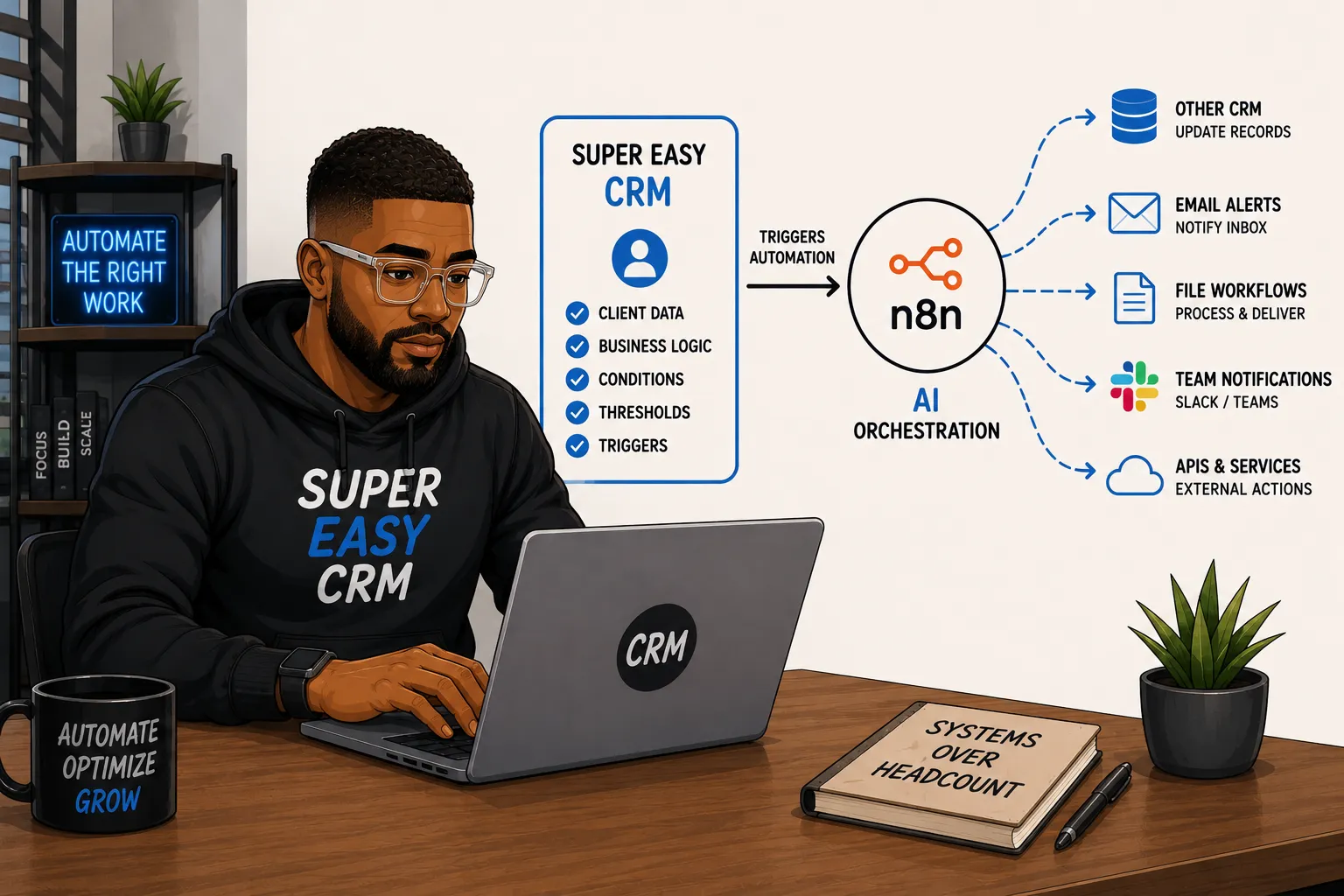
Most people think of n8n as the brain and the CRM as the thing it pushes data into. I build it the other way around.
The CRM is where the business logic actually lives, who the client is, what stage they're in, what threshold they've crossed, whether a file just landed on their account. n8n is the muscle that goes and does something about it once Super Easy CRM decides something is worth acting on. That distinction matters more than it sounds like it should, because it changes who's allowed to trigger an automation. It's not a person remembering to kick off a workflow. It's a condition being met inside the system that already knows the most about the client.
I want to walk through five ways I'm using this pattern right now, because they all hit the same nerve: stop relying on a human to notice something and go act on it, and let the CRM notice it the moment it happens.
Talking to Another System Without Sending an Email
Say you've got a client running their own CRM, or a smaller shop running something half built out of spreadsheets, and you need to keep a piece of data in sync between your world and theirs. The old way is you remember to check, you write an email, maybe you attach something, and now there's a human in the loop who has to read that email, open the other system, and manually update a field. That's slow and it's exactly the kind of step that gets skipped on a busy week.
In Super Easy CRM you set the automation builder to watch for the condition that actually matters, a stage change, a field update, whatever the trigger is, and the moment that condition fires, it kicks off an n8n workflow that goes and updates the other system directly. No email. No human remembering to do it. Only the specific piece of information you scoped gets sent, nothing more, so you're not opening up a wider sync than you actually need. The CRM is the source of truth deciding when something is worth communicating, and n8n is just the courier that goes and delivers it.
Billable Hour Alerts That Find You Even When You're Not Logged In
This one's for the other consultants reading this. If you bill by the hour against a retainer or a capped scope, you already know the moment a client crosses 80% of their hours is the moment you need to start managing the conversation, not the moment you find out three weeks later when you're reconciling invoices.
I set a threshold alert in Super Easy CRM at 80% of a client's contracted hours. When that threshold gets crossed, it triggers an n8n workflow that goes and tags my Gmail with a rule, something like "high hour utilization, approaching cap," applied directly to that client's email thread. I don't have to be in the CRM to know this is happening. I just have to be in my inbox, which I already am all day anyway, and the label is sitting right there on the thread reminding me before I even open the message. The system tells you what you need to know inside the tool you're already living in, instead of making you go check a dashboard.
Approval Routing Without the Slack Ping
This one's less about visibility and more about not letting a deal or a ticket stall out waiting on a person to notice it needs a second set of eyes.
Set a value threshold on a deal, or a flag on a ticket type that's high risk enough to need sign-off before it moves forward. When a record crosses that line, instead of someone having to remember to ping a manager or loop in compliance, the condition fires inside Super Easy CRM and n8n routes it to whoever actually needs to approve it, an email, a Slack message, a task assigned directly to them, however you've got it scoped. The deal doesn't move to the next stage until that approval comes back. Nobody's relying on a rep to remember the threshold exists, and nobody's manually checking a report at the end of the week to catch what slipped through.
What I like about this one specifically is that it's internal process instead of external communication, same trigger logic as the billable hours alert, just pointed inward. The CRM still owns the decision of when something needs another set of eyes. n8n just goes and gets those eyes on it.
Drop a File, Walk Away, Data Comes Out the Other Side Clean
I set up a designated process tied to a client's account that watches for a specific kind of file drop, something tagged client_data, for example. The moment a file with that designation lands on the account, it kicks off an n8n workflow that normalizes the data and moves it downstream to wherever it needs to go next. No manual step in between, no me opening the file to clean it up first.
The version I run constantly is contact data enrichment. A client sends me a raw dataset over email, names, maybe partial company info, nothing standardized. I drop that file into Super Easy CRM on their account, and that single action kicks off the whole pipeline. It normalizes the data, pushes it through Apollo and Apify and whatever other enrichment sources I've got wired into that flow, and pushes the cleaned up, enriched dataset back into the client's own CRM. All of it happens off one touch of the CSV. I'm not juggling versions of the file, I'm not worrying about which copy is the current one, and I'm definitely not handing anyone access to my Google Drive just to get a file from point A to point B. The file lands, the CRM recognizes what it's looking at, and the pipeline runs.
Image Generation Off a Task, From My Phone
I run content across four sites, FantasyBrawls, MattFlows, Super Easy CRM, and Fueling Food, and the image piece used to be the part I'd put off the longest because it meant sitting down at a computer, opening a generation tool, and going back and forth on prompts before I could even get back to writing.
Now I just drop the article content into a task in Super Easy CRM, the same way I'd assign any other piece of work. Once that task is created, it kicks off an n8n flow that takes the content, generates the images, and posts them back to the task for me to review. The whole thing runs without me touching a generation tool directly, and because it's just a task in the CRM, I can kick it off from my phone between meetings or while I'm out, and the images are sitting there waiting for review by the time I'm back at my desk.
What this one really removed wasn't the image generation step itself, it was the friction of needing to be at a computer with the right tab open to start it. The task is the trigger. Everything after that is n8n's problem, not mine, until it's time to actually look at what came back.
Why Automation Needs To Be Simple For Most People
A few weeks ago my AC went out in the middle of a South Florida summer, which if you've never experienced that is about as close to a genuine emergency as home maintenance gets. I'm pretty comfortable working on my Dodge Charger and have done enough under the hood over the years that I don't panic when something mechanical breaks. But home AC is a different animal entirely. Some of the principles overlap, refrigerant cycles, pressure, airflow, but the components, the terminology, the way the whole system is laid out is just different enough that I was mostly lost.
The tech who came out was clearly good at what he does. He was walking me through what he was finding and why, and all I could do was nod along while he referenced components and readings I didn't have the context to evaluate. At some point standing in my own garage feeling that way, it hit me that this is probably how people feel when I start talking about AI orchestration. Webhook triggers, node chains, payload mapping, it sounds like competence from the inside and like intimidation from the outside. Nobody wants to feel like the person they're paying knows so much more than them that they can't even ask a real question.
I never wanted Super Easy CRM to be that. But if I'm being straight with myself, somewhere in the race to build the most capable platform I could, I lost the thread on how all these features and terms land on someone who just wants their CRM to handle things for them. That's really what pushed me to build AI orchestration into the platform the way I did. Most people don't want to walk through n8n nodes. They don't want to learn a new tool on top of the tool they already bought. They know their CRM, they know what they want it to do, and if they've trusted me with their business, that should be enough. The platform needs to take it from there.
AI Orchestration For All, Not Just Devs
None of these five things are individually complicated. A sync trigger, a threshold alert, a file watcher, an approval route, a content task, you could build any one of them as a standalone n8n workflow without a CRM in the picture at all. What changes when the CRM is the thing deciding when to fire is that the business logic stays where the business context actually lives. The CRM knows who the client is, what they've contracted for, what stage they're in, and what a file landing on their account actually means. n8n doesn't need to know any of that, it just needs to know what to do once it's told to go do something.
That's the orchestration model I'd point other consultants and CRM admins toward, and the reason it isn't just for developers is that the trigger is a condition in a UI you're already working in, not a cron job someone has to write and maintain. Build your automations so the CRM is the one deciding when something matters, and let your external tools handle the execution. It keeps the logic centralized, it keeps the audit trail in one place, and it means the system that knows your client best is the one actually in charge of when something happens.
